If you're familiar with video streaming, skip to the OBS pull request. Otherwise, here's a quick primer on the concepts and acronyms used in this post.
Compression
Sending raw 4K video (3840×2160, 8-bit YUV420) at 30 FPS would require ~3 Gbps. We need a way to make that smaller! Video compression reduces the amount of data we need to send. There are two types to understand here.
The first is intra-frame compression, which reduces the bits used to describe a single video frame. Similar techniques are used to compress images, as in JPEG.
The second is inter-frame compression. Since video is made up of many pictures, we look for ways to avoid sending the same information twice. The following illustration shows inter-frame compression in practice.

Keep this picture in mind, this is what we are going to discuss later!
Protocols
Today, the de facto standard for live video upload is RTMP (Real-Time Messaging Protocol). Video streaming software (including OBS, FFmpeg, and GStreamer) use RTMP to upload audio and video over a TCP connection in FLV format.
One alternative to RTMP is WHIP: it uses WebRTC to upload video. One useful feature we get with WHIP is receiver feedback. The server can report how many packets it received, whether any packets were lost, and other information about the stream. We can use this feedback to improve video streaming!
A PR to improve latency
A OBS PR was opened recently. The goals of the PR have nothing to do with bitrate savings. If you read the PR description the intent is to improve sync and latency. However, I think it will have a very exciting side effect!
Right now with video streaming OBS users will do a Keyframe on a fixed interval. Every two seconds they will send a Keyframe and it works pretty well! Users when watching the stream may need to wait 2 seconds though. If they join during an Inter-Frame they can't start watching the video until they get a Keyframe. This PR makes it so a viewer can request a Keyframe at any time, allowing them to start decoding video sooner.
Reduce the Keyframes
Now think back to the Pac-Man picture. If Pac-Man isn't moving, it seems wasteful to keep sending Keyframes. You should only send them when something has changed. I was curious, so I re-encoded Big Buck Bunny at different bitrates and Keyframe intervals. Here are the results.
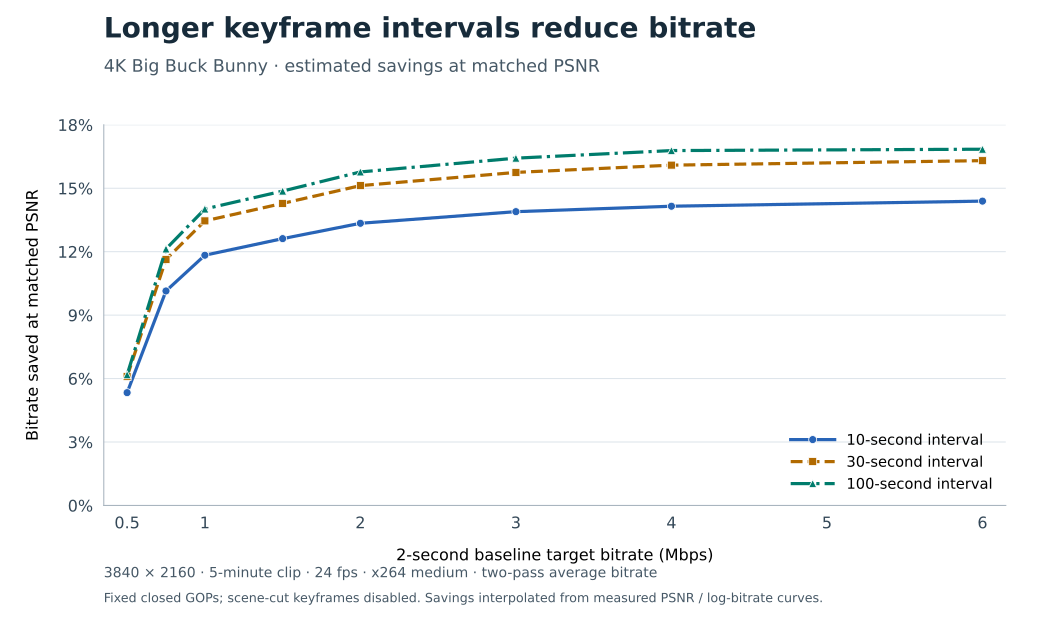
Pretty exciting results! Under the right conditions an OBS user could use 15% less bitrate and get the same quality. Or you keep using the same bitrate and improve your quality.
Keyframes and WHIP
How can we use Keyframe intervals to improve quality and bitrate? With WHIP we can set a very large interval, and request them as needed!
A server can send receiver feedback, such as a PLI, to request a Keyframe. Users could set OBS to use a 30-second Keyframe interval. When a new viewer joins, the WHIP server would send a PLI to OBS. This could give us the best of both worlds. Fast playback for new viewers and lower bitrate for viewers who keep watching!
Caveats
A few caveats to call out.
- Keyframes aren't instant - Sending a PLI to OBS to request a keyframe takes time. If internet/servers are slow this could be worse than having a pre-set interval.
- Set a floor on keyframes - If you have many viewers you could be requesting constant keyframes. For high traffic streams the server needs to set a floor on PLI requests.
- CDN/Recording Impacts - Long keyframes will have impacts on things like HLS/Recording. With high keyframe interval it will make seeking on saved Videos longer.
I'm excited about these results and look forward to testing this with Broadcast Box to see how it performs in practice.